Product tour

The tools your team uses to turn project files into qualified opportunities.

GAIA Civil combines project intake, opportunity screening, detailed project analysis, source verification, connected search, browser-assisted plan-set transfer, and team controls in one workspace built for geosynthetics manufacturers and distributors.

Individual and merged PDFs Screening and full analysis Source-linked reports and exports Bidding-platform browser extension

Current product areas

A focused area for each part of the review.

The current product includes five primary areas in the signed-in GAIA Civil workspace plus a Chrome browser extension. Each handles a distinct job while sharing the project context needed for the next decision.

Chat

Analyze a project in context.

Keep a conversation tied to the active project, add PDFs when needed, choose the appropriate analysis workflow, and open completed reports without leaving the workspace.

  • Project-bound conversations
  • PDF attachments and project selection
  • Workflow, research, and report views
Upload Projects

Bring in the document set your way.

Upload project PDFs individually or combine a set, associate them with a new or existing project, and choose fast screening or full analysis.

  • Individual-file and merge-PDF intake
  • Fast screening or full-analysis mode
  • Project assignment and intake status

Project Hub

Manage the opportunity queue.

Keep screened candidates separate from analysis-ready documents while retaining the controls needed to search, filter, group, promote, or rescreen them.

  • Screening and full-ingestion lanes
  • Decision and status filters
  • Evidence drawer and promotion controls

Query Architect

Build better project searches.

Create and refine Boolean search strategies from configured products, applications, competitors, and instructions, then keep useful searches in a shared library.

  • Strategy generation and refinement
  • Combine and revise selected strategies
  • Saved Library and Favorites

Browser extension

Move tenant-relevant plan sets into GAIA Civil.

Use a Chrome side panel to automate the manual project click-through and plan-set download process on supported bidding platforms, then send the relevant authorized document set directly into GAIA Civil.

  • Query Architect strategy dropdown
  • Batch import or one-button Quick Import
  • Screening or full-ingestion destination

Permission boundaries stay visible. Member management appears only for users with the required access. Browser-extension transfers remain user-initiated and limited to authorized source-platform projects and documents.

Project Hub and opportunity screening

Screen broadly, inspect the evidence, and promote only the projects worth deeper work.

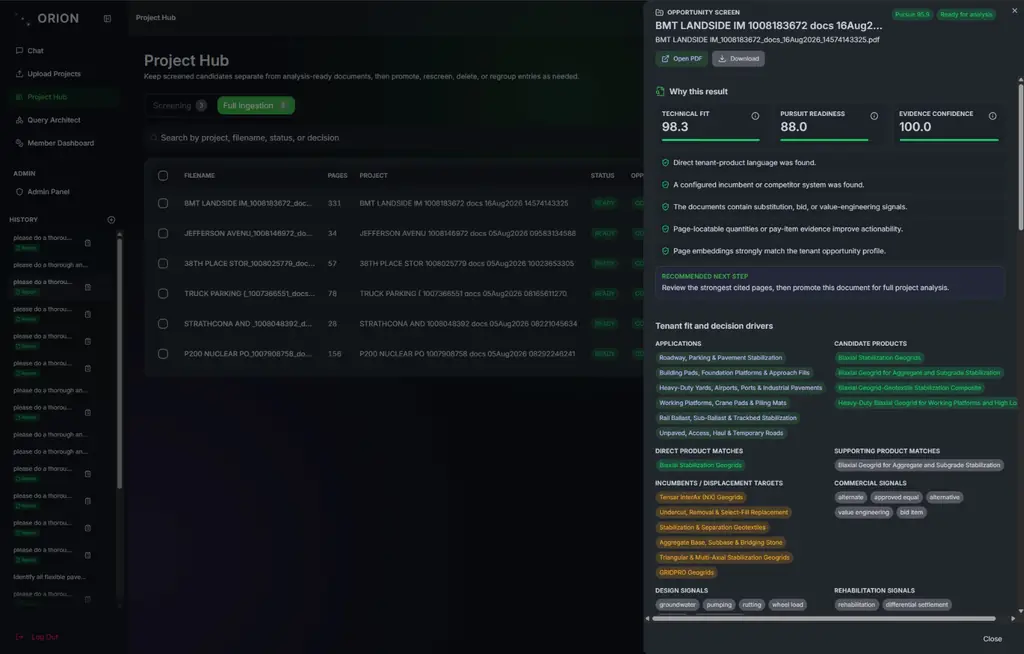
The Project Hub keeps lightweight opportunity screening and full document ingestion in separate lanes. Teams can search by project, file, status, or decision; review the evidence behind a screen; and move qualified candidates into the analysis-ready set.

A queue built around qualification.

Each screened document can carry its opportunity decision, supporting signals, processing state, and evidence details. Promotion and rescreening controls keep deeper review effort focused without hiding why a project advanced.

Screening laneFull-ingestion laneOpportunity evidenceSearch and status filters
For business development and preconstruction teams: a faster way to decide where specialist review time belongs.
GAIA Civil Project Hub opportunity screen with a decision, supporting signals, and source evidence.
The opportunity evidence drawer keeps the screening decision and its supporting project context together.

Project analysis and reporting

Turn the document set into a report another reviewer can inspect and continue.

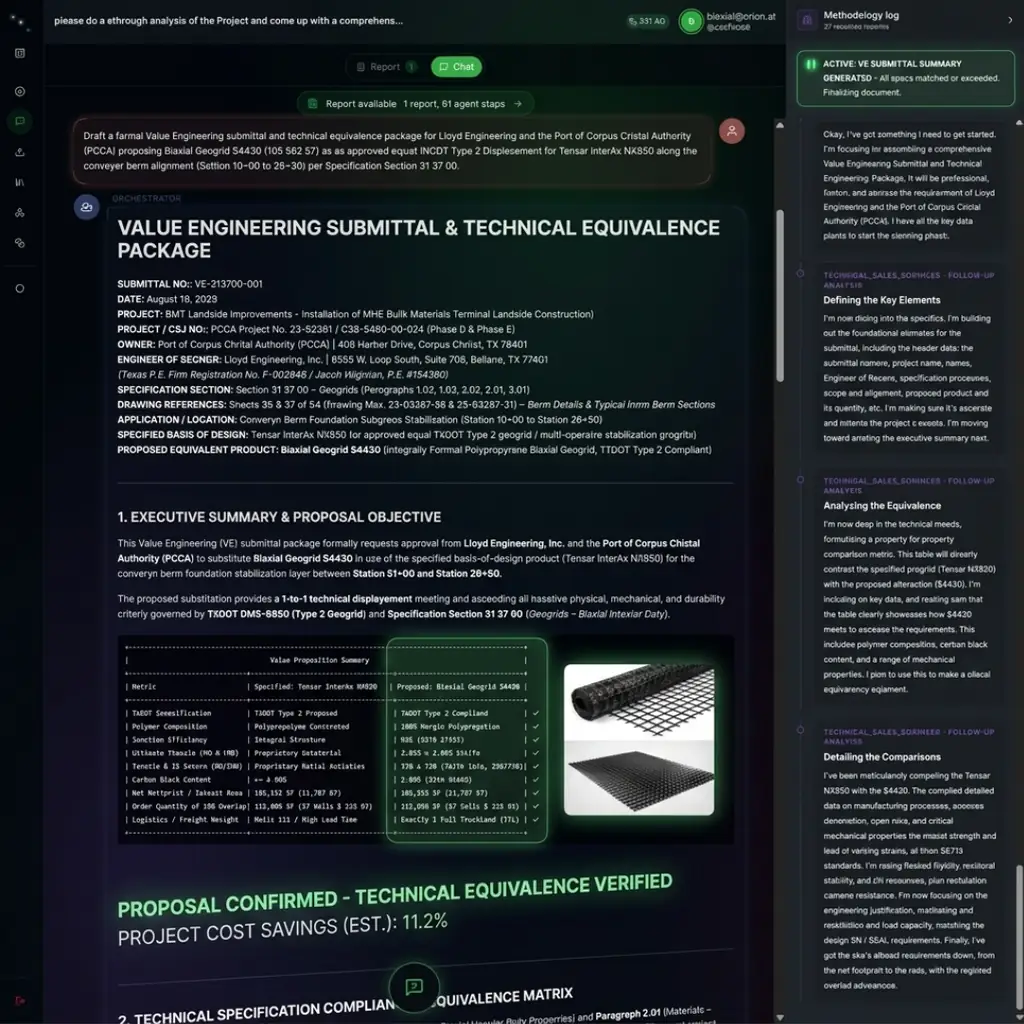
Project-bound analysis produces a Qualified Opportunity Report rather than a detached chat answer. The report organizes the project record into decision-ready sections and keeps sources, warnings, assumptions, and follow-up questions available for review.

The Qualified Opportunity Report.

Review project information, material needs, the executive summary, detailed opportunities, strategic context, evidence, and additional findings from one navigable report.

Project informationBill of materialsDetailed opportunitiesEvidence reviewVersion history
Calculation traceSee quantity, method, scale basis, confidence, and source status where the project record supports measurement.
Review continuityPreview saved report versions, restore a prior version, and continue with follow-up report actions.
GAIA Civil Qualified Opportunity Report with project, material, opportunity, calculation, and evidence sections.
The report gives commercial, estimating, and technical reviewers one structured handoff with its evidence and review state intact.

Query Architect and browser extension

Build the search, then pull the relevant plan set into GAIA Civil.

Query Architect gives business development teams a dedicated place to build, refine, and retain project searches. Saved strategies feed the GAIA Civil strategy dropdown in the Chrome extension, which carries the selected query into supported bidding platforms and automates the manual click-through and plan-set download work.

Strategy Builder and Saved Library.

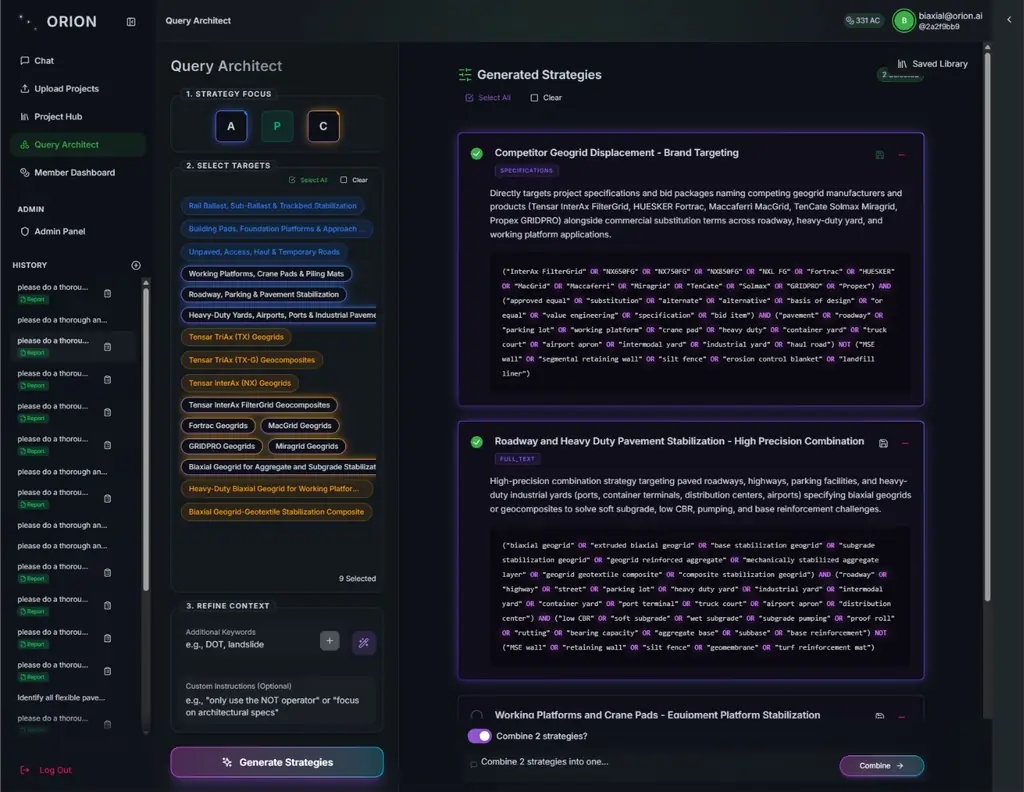
Select configured products, applications, competitors, and general targets; add instructions; generate strategy options; then refine or combine the strongest queries. Useful searches can be saved and favorited for reuse.

Configured search targetsGenerate, revise, or combineSaved LibraryFavorites
For business development teams: repeatable search strategy without rebuilding Boolean logic for every pursuit.
Chrome browser extension

Import the tenant-relevant project documents directly into GAIA Civil.

Choose a strategy saved in Query Architect from the extension dropdown, or enter a Boolean query directly. When the user chooses Import selected projects, the extension applies the tenant-specific scope, gathers every authorized project document or page that matches it, and sends the resulting set directly to GAIA Civil. Opportunity screening places it in the Project Hub Screening lane; full ingestion places it in the Full ingestion lane.

Quick Import: While viewing an authorized project document set on a supported bidding platform, one button pulls that project's tenant-relevant matching pages directly into GAIA Civil screening.

The extension works from the user’s authorized bidding-platform session; it does not automate sign-in or bypass source access.
GAIA Civil Query Architect with strategy controls and a saved search library.
Strategy Builder keeps target selection, generated query options, refinement, and the Saved Library in one work area.

Built for the whole review team

The same opportunity, presented for the decision each person owns.

GAIA Civil does not replace role authority. It keeps the working record connected while each reviewer applies their own commercial, estimating, technical, or administrative judgment.

Business development and preconstruction

Project discovery and qualification

Query Architect, browser-assisted plan-set transfer, screening results, Project Hub decisions, and next-step context.

Estimating and technical reviewers

Requirements, quantities, and evidence

Project analysis, material needs, calculation trace, source inspection, and open questions.

Workspace leaders

Access, capacity, and continuity

Member roles, seat policy, usage visibility, and report history.

For workspace leaders

See access and usage clearly.

Member Dashboard brings together workspace members, invitations, seat policy, reservations, and the usage ledger. Member management is available to authorized users.

Understand seats and analysis credits

See the current product

Walk through GAIA Civil using the kind of project files your team reviews today.

We’ll focus the demonstration on the product areas and reviewer roles that matter to your opportunity process.