GAIA Civil feature reference

One system to discover, quantify, verify, and deliver project opportunity.

GAIA Civil combines ORION-powered 3-minute opportunity screening, multimodal document intelligence, specialist project analysis, deterministic calculation traces, visual evidence review, and governed deliverables in one construction-native workspace.

GAIA Civil platformConnected review workspace
Ingest 01 Screen 02 Analyze 03 Verify 04 Deliver 05
REVIEW STATEEvidence connected Ready for human review
3-Minute screening Multimodal plan intelligence Scale-calibrated takeoffs Audit-ready deliverables

Capability index

The complete customer workflow in one view.

This index shows what the user receives and which inspectable record travels with the capability. The detailed sections below explain operation, evidence, and boundary.

GAIA Civil customer-visible capability inventory
StageCapabilityUser-visible resultEvidence or state retained
IntakeMulti-PDF uploadValidated project source setFile state, hash, page count, project link
IntakePDF merge workflowNamed merged PDF for download or ingestionInput order and generated file
IntakeProcessing-mode choiceFast screen or full analysisMode, credits, approval, and status
OrganizeProject HubScreening and full-ingestion lanesProject/document lifecycle and actions
DiscoverQuery ArchitectReusable Boolean strategiesTargets, refinements, instructions, and library metadata
DiscoverMaster Document FilterGoverned pre-filterSaved revision, profile hash, and segments
DiscoverConnected source hubsAttributed discovery and screening queueSource/company/project attribution
ScreenOpportunity scoringPursue, review, or rejectThree component scores, reasons, signals, and pages
IngestMultimodal page processingText and visual evidence indexPage assets, chunks, components, provenance, and failures
AnalyzeProject Analysis V2Typed need-to-report workflowNeeds, evidence, measurements, warnings, and stage log
AnalyzeTenant analysis skillsDomain-specific methodsEnabled skills, dependencies, and variables
MeasureAccuracy profilesBallpark, takeoff, or quote-ready pathScale, formula, assumptions, confidence, and review state
CollaborateProject-aware chatContextual follow-up investigationProject, workflow, attachments, and report action
VerifyEvidence viewerFinding beside sourceDocument, page, region, image/PDF, and highlight
VerifyMethodology and calculation traceInspectible analysis basisMethods, measurements, assumptions, validation, and questions
ReportQualified Opportunity ReportModular opportunity dossierSources, sections, warnings, actions, and appendix
ReportVersion historyPreview and restore-as-newVersion number, parent, source message, change summary
DeliverEngineer verification packetSource-linked review PDFContents, contacts, checklist, BOM, citations, and context pages
OperateMember dashboardUsage and seat visibilityCredits, reservations, policy, roles, and ledger
OperateTenant and platform administrationGoverned users and knowledgePermissions, libraries, document state, and vector diagnostics
01

Intake and organize

Bring project records into a controlled workspace, select the depth of processing, and keep lifecycle state visible after upload.

Multi-PDF project intake

Upload multiple project PDFs into an existing project, create a new project, or let screened document sets be grouped from title, project-number, and filename signals.

  • PDF validation and duplicate-content checks
  • Existing, new, or generated project grouping
  • Per-file acceptance and processing feedback
Result, record, and boundary
User result
A registered source set with project, document, and processing identity.
Boundary
Upload acceptance is not analysis completion; Project Hub remains the lifecycle record.

Fast screening or full analysis

Choose the lighter opportunity-screening lane or the comprehensive ingestion and Project Analysis V2 path for each project-document upload.

  • Zero Analysis Credits for screening
  • Credit estimate and confirmation for full analysis
  • Promotion from screening to full analysis
Result, record, and boundary
User result
A deliberate processing path matched to the review decision.
Boundary
Screening prioritizes documents; full analysis is a separate promoted workflow.

Project Hub and document operations

Separate screened candidates from full-ingestion documents and manage the record through search, filters, status, activation, regrouping, rescreening, retry, promotion, and deletion.

  • Screening and full-ingestion lanes
  • Queued, running, ready, inactive, and failed states
  • Multi-select regrouping and controlled document actions
Result, record, and boundary
User result
A searchable pipeline record from intake through analysis readiness.
Boundary
Permanent deletion and role-gated operations require deliberate user action.
02

Discover and screen

Translate field knowledge into repeatable discovery logic, then explain why a candidate deserves deeper attention.

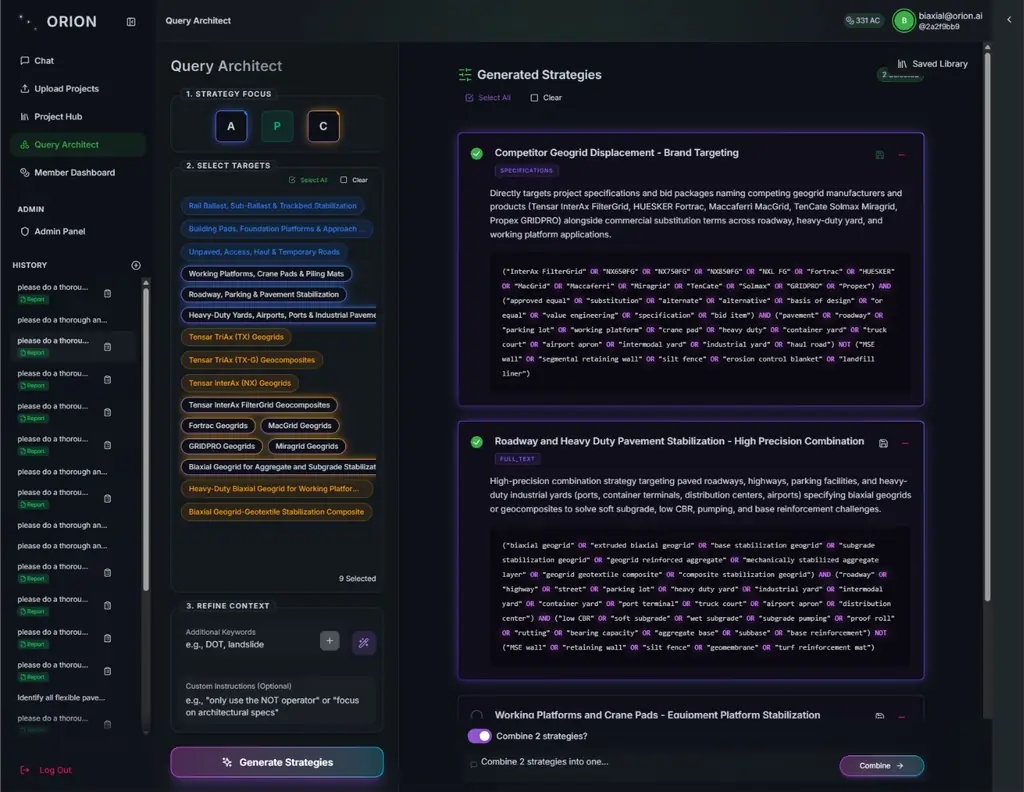
Query Architect

Build Boolean discovery strategies from selected applications, products, competitors, suggested terms, custom keywords, and reviewer instructions.

  • Generate, edit, refine, save, and combine strategies
  • Favorites, filters, sorting, and list/grid library views
  • Readable strategy descriptions beside the query
Result, record, and boundary
User result
A reusable and reviewable discovery strategy-not a hidden search prompt.
Boundary
Source access and returned results depend on the authorized source workflow.

Master Document Filter

Curate the tenant-wide Boolean filter applied before new discovery exports, ingestion, and screening, with revision protection and preserved context segments.

  • Generated baseline and validation
  • Protected context terms and segment preview
  • Revision/profile conflict protection
Result, record, and boundary
User result
A governed pre-filter shared by the approved discovery workflow.
Boundary
Edits affect new imports; previews reflect the last saved revision.

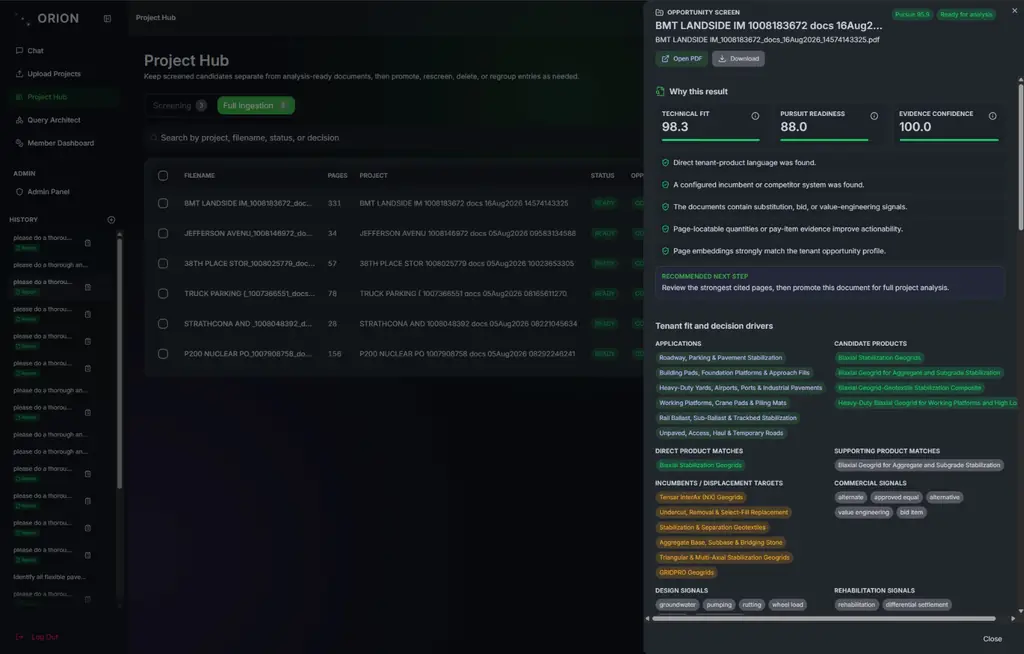
Explainable opportunity screening

Rank candidates against configured products, applications, incumbents, commercial language, design signals, exclusions, quantity evidence, and semantic page matches.

  • Pursue, review, or reject decision
  • Technical Fit, Pursuit Readiness, and Evidence Confidence
  • Reasons, strongest pages, candidate products, and verification requirement
Result, record, and boundary
User result
A score with visible decision drivers and source-page evidence.
Boundary
The score prioritizes review; it is not a probability of winning.
03

Analyze and measure

Turn the selected project into typed needs, targeted evidence retrieval, specialist analysis, calculations, and reconciled material recommendations.

Evidence-first Project Analysis V2

Resolve one authorized project snapshot, extract typed needs, retrieve evidence per need, run specialist analyses, validate results, reconcile BOM rows, and assemble the core report.

  • Stable source order and typed schemas
  • Parallel need-specific retrieval with exact fan-in
  • Explicit no-evidence and no-opportunity outcomes
Result, record, and boundary
User result
A structured evidence record instead of one free-form model response.
Boundary
Direct attachments must be ingested before they can support report citations.

Configurable civil analysis skills

Apply tenant-enabled skill modules for audit, scale calibration, civil quantities, order quantities, QA, and discipline-specific takeoff methods.

  • Roadway, earthwork, utilities, and linear features
  • Geogrid, erosion control, and channel linings
  • MSE walls, sheet piling, shoring, and concrete structures
Result, record, and boundary
User result
Domain methods composed into only the specialist roles that need them.
Boundary
The catalog is broader than any single tenant or project configuration.

Accuracy profiles and calculation engine

Support BALLPARK, TAKEOFF, and QUOTE_READY accuracy profiles with deterministic local arithmetic, scale/geometry analysis, confidence calculation, and explicit input gaps.

  • Source, scale, formula, units, and assumptions retained
  • Cross-source agreement and conflict handling
  • UNKNOWN and needs-input states instead of silent values
Result, record, and boundary
User result
A quantity with an inspectable basis and verification status.
Boundary
The selected profile and required human approvals remain visible.
04

Verify and collaborate

Inspect the physical source, watch the workflow, ask follow-up questions in project context, and separate evidence from unresolved judgment.

Citation preview and document viewer

Group evidence by document/page/region, preview source imagery or text, and open the selected evidence in a zoomable drawing/PDF viewer.

  • Rendered-image and original-PDF modes
  • Bounding-box highlights when available
  • Zoom, pan, magnifier, reset, and keyboard controls
Result, record, and boundary
User result
A direct route from the finding to the original source context.
Boundary
Exact coordinates depend on the indexed evidence region; page-level citations remain the base locator.

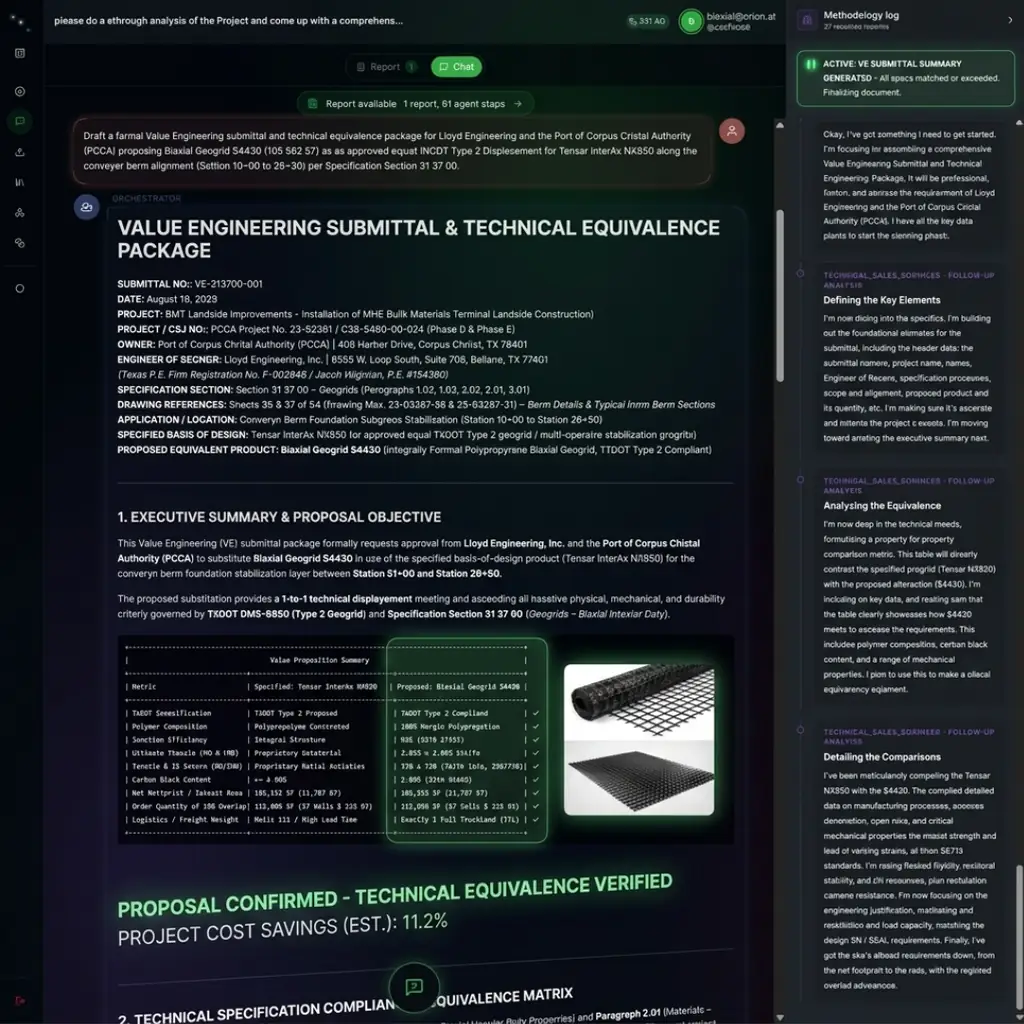
Project-aware chat and workflow selection

Ask follow-up questions in the context of an analysis-ready project, choose the interaction workflow, attach supporting files, and route report actions back into the conversation.

  • Automatic, interaction, collaborative, and project-analysis modes
  • Multiple attachments, pasted images, focus topics, and keywords
  • Specialist-targeted follow-up prompts
Result, record, and boundary
User result
A continuing investigation connected to the selected project and report.
Boundary
Report follow-ups return to GAIA Civil chat with ORION; they are not automatically sent emails or CRM updates.

Live stage and methodology visibility

Follow elapsed time, progress, stage status, units, methods, measurements, assumptions, validation updates, and client-facing working summaries as analysis runs.

  • Scope, measurement, evidence, engineering, BOM, report, and review stages
  • Detailed agent/stage process log
  • Methodology record without exposing private chain-of-thought
Result, record, and boundary
User result
A visible account of what the workflow did and where review is needed.
Boundary
The methodology record is an operational review aid, not hidden model reasoning.
05

Report, export, and operate

Package the result for commercial and technical review, preserve revisions, export evidence, and govern users, credits, and knowledge sources.

Qualified Opportunity Report

Render project intelligence, candidate BOM, summary, detailed opportunities, strategy, calculation trace, evidence review, needs review, and appendix as one modular report.

  • Workflow version, warning count, and source count
  • Pursuit, product-match, and quantity confidence kept distinct
  • Recommended actions and material-gap drill-downs
Result, record, and boundary
User result
A dossier that keeps evidence, calculation, uncertainty, and action together.
Boundary
Sections may be empty when the evidence does not support them.

Version history and deliverable exports

Preview saved reports, restore an earlier report as a new current version, copy Markdown, and export report, chat, Deep Research, or engineer-verification PDFs.

  • Restore-as-new version lineage
  • Engineer packet with contents, citations, context pages, and review checklist
  • PDF and structured output paths
Result, record, and boundary
User result
A shareable review package with source context and preserved revision history.
Boundary
Export content follows the active report/export path; temporary version preview is not itself a revision.

Member, usage, and platform administration

Track credit balance and reservations, operator seats, usage policy, member roles, tenant libraries, document activation, access requests, and vector-health diagnostics.

  • Owner, Tenant Admin, Operator, and Viewer roles
  • Separate tenant-owner and platform-admin authority
  • Product and engineering-manual knowledge libraries
Result, record, and boundary
User result
An operating layer for the people, budget, and knowledge behind the workflow.
Boundary
Platform administration remains separately gated from tenant ownership.

Interface examples

Four places where inspectibility changes the work.

Illustrative product views show the interaction model: author repeatable discovery logic, understand why a project was screened, open the physical source beside a finding, and inspect the quantity formula and approval state.

QUERY ARCHITECT · DISCOVERY STRATEGYFull-size view
GAIA Civil Query Architect showing selected applications and products beside generated discovery strategies.
Illustrative strategy-authoring view. Visible names, terms, and selections are demo content rather than a customer configuration.

Field knowledge becomes repeatable discovery logic.

Query Architect turns application, product, competitor, and commercial-language context into reviewable strategies that teams can save, refine, and reuse.

Screening explains the rank.

Review component scores, decision drivers, signals, cited pages, and the recommended promotion path before spending full-analysis credits.

OPPORTUNITY SCREENReady for analysis
TECHNICAL FIT94.0
PURSUIT READINESS88.5
EVIDENCE CONFIDENCE92.0
  • Applicable product and application language located.
  • Commercial flexibility signal appears in the source set.
  • Page-locatable evidence improves actionability.
RECOMMENDED NEXT STEPReview the strongest cited pages, then promote for full analysis.
Illustrative interface and scores-not a customer result.
ORIGINAL REQUIREMENTPavement stabilization detail

The source identifies a reinforcement layer and base condition for qualified technical review.

Current materialNamed system in source
Review pathPotential alternative evaluation
SURFACEBASESUBGRADE
TYPICAL PAVEMENT DETAILIllustrative source page

Evidence stays beside the claim.

Move from a report finding into the rendered page or original PDF, inspect the highlighted region, and keep unresolved technical judgment visible.

Quantities show their basis.

Keep source, scale, dimensions, formula, allowance, units, confidence, and review state available to the estimator or technical reviewer.

QUALIFICATION QUANTITYCalculation trace
SourceSchedule of values · Item 31-14
Documented area6,895 SY×Configured allowance1.05=Order quantity7,240 SY
Formula6,895 × 1.05 = 7,239.75 → 7,240 SYReview state Allowance requires approval

Illustrative values only. Verification status and accuracy profile control how a quantity may be used.

Input and output contract

From approved source material to governed deliverables.

GAIA Civil keeps what entered the workflow, what ORION derived, and what still requires approval visible in the same system.

APPROVED INPUTS

Project and tenant context

  • Plans, specifications, addenda, and geotechnical records
  • Schedules, details, tables, and quantity sources
  • Product catalogs, engineering manuals, and approved-equal context
  • Qualification thresholds, exclusions, accuracy profile, and review rules
REVIEWED OUTPUTS

Evidence and action artifacts

  • Screening decision and Qualified Opportunity Report
  • Scale, measurement, BOM, and calculation traces
  • Visual citations, evidence review, and engineer packet
  • Approved API, webhook, MCP, JSON, CSV, and PDF handoffs

Features FAQ

Questions about modes, quantities, methodology, and outputs.

The feature set is broad, but each capability still has an explicit processing state, evidence record, and user responsibility.

Is fast screening the same as full analysis?

No. Screening is a lighter, zero-Analysis-Credit prioritization lane that produces decision scores, reasons, signals, and evidence pages. Selected documents can then be promoted into full multimodal ingestion and Project Analysis V2 with the normal estimate, permissions, and confirmation path.

What can the quantity engine show?

Depending on the selected accuracy profile and available evidence, ORION can show documented quantities, independently measured quantities, formula inputs, scale basis, pixel trace, assumptions, conflict checks, confidence methodology, and needs-input questions in GAIA Civil. BALLPARK, TAKEOFF, and QUOTE_READY have different rigor and review requirements.

Does Query Architect search sources by itself?

Query Architect authors and manages the discovery strategy. Approved source connectors or source hubs execute that strategy within their own authorization, company/project scope, sync, filter, and batching rules.

What does the methodology log contain?

It contains client-visible methods, measurements, assumptions, validation activity, stage status, progress, and concise working summaries. It is not a transcript of private model chain-of-thought.

Which deliverables can users take out of GAIA Civil?

The current product supports Markdown copy, qualified-report PDFs, engineer verification packets, Deep Research/report/chat PDF paths, downloadable source attachments, and documented JSON/CSV/PDF integration outputs for approved production workflows.

Are all analysis skills active for every customer?

No. The checked-in catalog defines available skill modules and dependencies. Each tenant enables the relevant disciplines, estimating variables, and specialist roles for its products and operating method.

See GAIA Civil in context

See the full feature set against your project workflow.

Bring a representative plan set, your product and engineering context, and the outputs your commercial and technical reviewers need to trust.